Definition
A market order fills now against the best prices on the order book. A limit order fills only at your price or better, so it may not fill. A stop order waits until price reaches a trigger, then sends a market or limit order. Reduce-only is a restriction on an order that lets it shrink or close a position but never open or enlarge one.
Each type trades certainty of filling against certainty of price. A market order gets the fill and accepts the price. A limit order gets the price and accepts that it may not fill. Use this page to decide which order type fits the entry, the stop and the target in a plan you have already written.
How it works
Market orders
A market order takes whatever is resting, starting at the best price and walking down the book until the size is filled. It normally fills while there is liquidity, though price protections on some exchanges can leave a large order part-filled or cancelled. It usually pays the taker fee, the spread and any slippage. In a thin book the cost is large: the trading costs page shows the same 10 units costing 0.12% over the best ask in a deep book and 0.62% in a thin one. Use a market order when getting in or out matters more than the price.
Limit orders
A limit order names the worst price you will accept. A buy limit below the best ask waits on the book. Other traders can then fill it, you often pay the lower maker fee, and you avoid crossing the spread. Fee schedules differ, and whether you count as a maker follows how the order executes. The cost is that price may touch your level without filling you, or never reach it. A trade you miss is a decision, not a saving. A buy limit at or above the best ask is marketable: it fills at once against the asks, up to your limit, and pays the taker fee.
For arithmetic only, take the thin book from the costs page: 2 units asked at 100.00, 3 at 100.40, 5 at 101.00. A buy limit for 10 at 100.00 fills 2 now and leaves 8 resting at 100.00, filled only if sellers come down to it. A market buy fills all 10 at about 100.62. Many forms also offer post-only, which rejects an order that would fill at once, or on some exchanges reprices it, instead of paying the taker fee.
Stop orders
A stop has a trigger price and stays dormant until the price source the form uses reaches it. It then sends one of two orders.
- Stop-market. Sends a market order. It normally fills in a fast move, at a price that can be worse than the trigger. This manual defaults to it for protective stops.
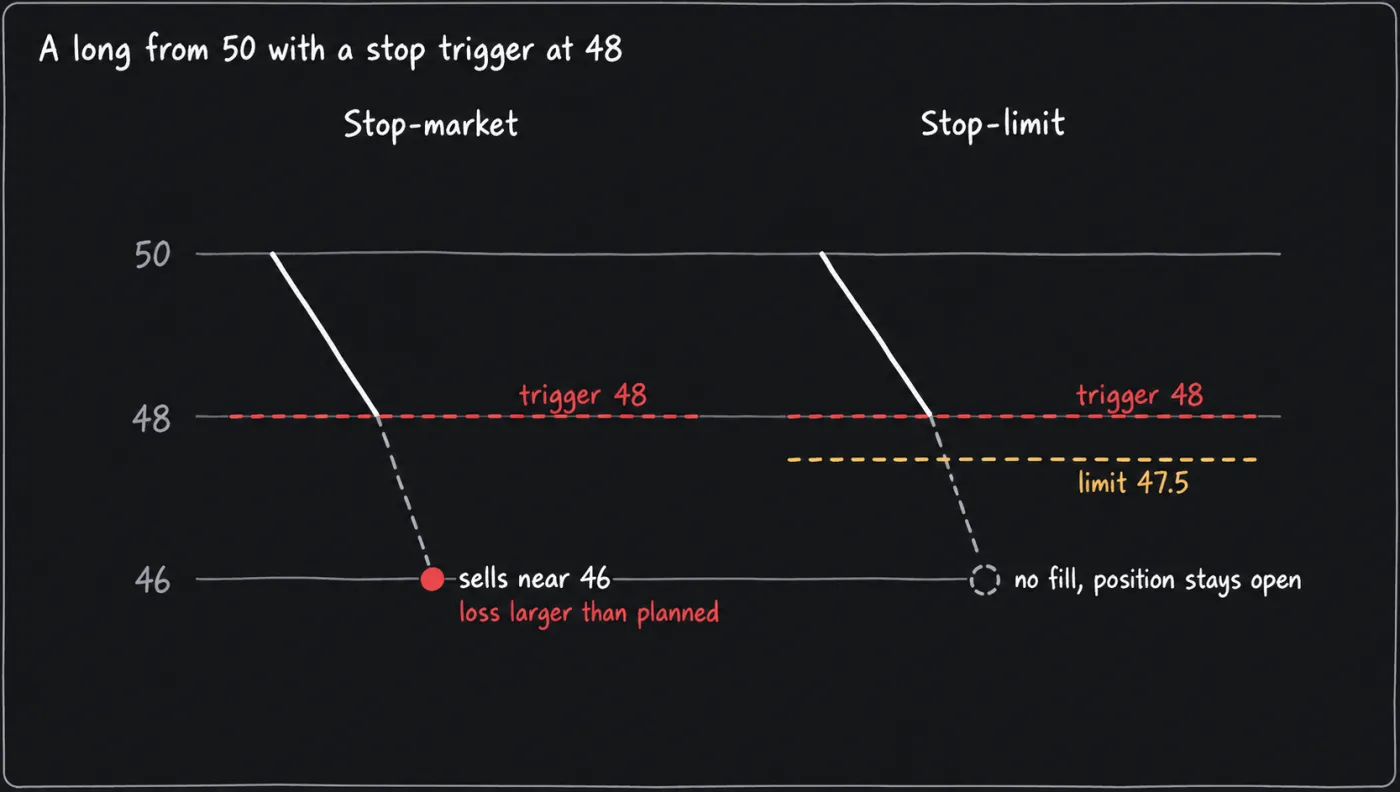
- Stop-limit. Sends a limit order that carries its own price. Closing a long means selling, so its limit belongs below the trigger. Closing a short means buying, so its limit belongs above. Set the limit equal to the trigger, let price jump past both, and the order rests unfilled with the position still open. A stop that does not fill protects nothing.
Assume a long at 50 with a stop trigger at 48. A stop-market sells into whatever is resting once 48 is reached, so a gap to 46 fills near 46 and the realised loss is larger than planned. A stop-limit with its limit at 47.50 refuses to sell below 47.50, so if bids sit only near 46 the order stays unfilled and the position stays open. The limit protects the price at the cost of the exit. Stop-loss placement covers where the trigger goes. A stop can also open a position: a buy stop above current price enters a breakout once it triggers, and a stop-market entry carries a market order's slippage.
The form may let you pick which price triggers a stop: last, mark or index. A mark trigger is less likely to be set off by one print on a thin book, and can fire later or earlier than a last trigger in a fast market. Read the field.
Targets and reduce-only
A target is usually a limit order on the profit side. It often pays the maker fee, but may not fill if price only touches it. Many forms also offer a take-profit trigger that sends a market or limit order.
A reduce-only order can only shrink the position. Suppose a long of 10 units has a stop to sell 10 and a target to sell 10. The target fills and the position is closed, but the stop is still on the book. Without reduce-only, that stop can trigger later and open a short of 10 you did not plan. With it, the exchange rejects, trims or cancels the order, depending on the exchange. Some forms also offer a close-position option that closes the whole position at the trigger.
Default settings
This page cites no published default for order choice, so the table lists the reference values this manual uses.
| Item | Value | Status and limitation |
|---|---|---|
| Entry order | Limit when a missed fill is acceptable, market when getting in matters more | Convention. A limit order may not fill. |
| Protective stop | Stop-market, reduce-only | This manual's choice. It fills at the cost of slippage, which is why the realised loss can exceed the planned loss. |
| Variation: stop-limit | Limit on the fillable side of the trigger | For traders who want a price limit. It can miss in a gap. |
| Trigger price | Last, mark or index, as the form offers | No default here. Exchanges differ, so read the field. |
How it is used in this manual's setups
Every setup writes its stop as a real order, attached to the entry where the form allows and otherwise placed as soon as the entry fills, sized to the filled quantity, reduce-only where the form offers it. The ending diagonal breakdown is a short, so its stop is a buy order with any limit above the trigger. The entry order type is chosen at the execute step of the decision cycle. A large entry can be split across several limit orders, as laddering entries covers, and placing orders covers the order form.
Common mistakes
- A stop-limit with the limit equal to the trigger. Put the limit on the fillable side, or use a stop-market.
- A market order into a thin book. Compare your size with the depth near the price.
- A stop left without reduce-only after the target fills. Check whether orders are cancelled when a position closes, because on many exchanges they are not.
- Typing the wrong unit. Forms differ on contracts, units or dollars, so check which one you typed.
- Assuming a limit order fills when price touches it. Orders queue, and price can touch a level without filling yours.
What this cannot tell you
- The fill you will get. A market order depends on the book at that moment, and a stop triggers into whatever is resting then.
- That a stop will exit at its price, or at all. No order type fixes the exit price in a gap, and a stop can be rejected, part-filled or cancelled, so the realised loss can exceed the planned loss.
- How your exchange handles an order. Reduce-only trimming, post-only, trigger-price options and what happens to open orders when a position closes vary by exchange. The order form and the exchange's help pages decide.
- When to enter or exit. Order types execute a plan. They do not write it.
Questions
Is a limit order better than a market order?
Neither is better in general. A limit order controls the price and may not fill, and a market order controls the fill and accepts the price. The choice follows what the plan needs.
What is the difference between stop-market and stop-limit?
Both wait for a trigger price. A stop-market then sends a market order, which fills at the next available price, and a stop-limit sends a limit order, which fills only at its limit or better and can miss in a fast move.